Published on February 4th, 2026
New in Sharetribe 🎉 Customize the price negotiation flow
Choose how providers and customers can negotiate on price: through counter offers, offer updates, both, or neither.
You can now build an even more complex price negotiation flow with Sharetribe, without coding. Our latest release lets you customize how customers and providers negotiate on price.
Before this release, the price negotiation process only supported a basic negotiation flow: the provider makes an offer, and the customer makes a counteroffer. However, this approach isn't right for all marketplaces.
That’s why you can now:
- Let providers update their offers—no customer counter offers
- Let customers make counter offers—no offer updates
- Enable both offer updates and counter offers
- Disable pricing changes after the initial offer entirely
Learn more about offer updates and how to enable different negotiation options below.
How to update the negotiation flow
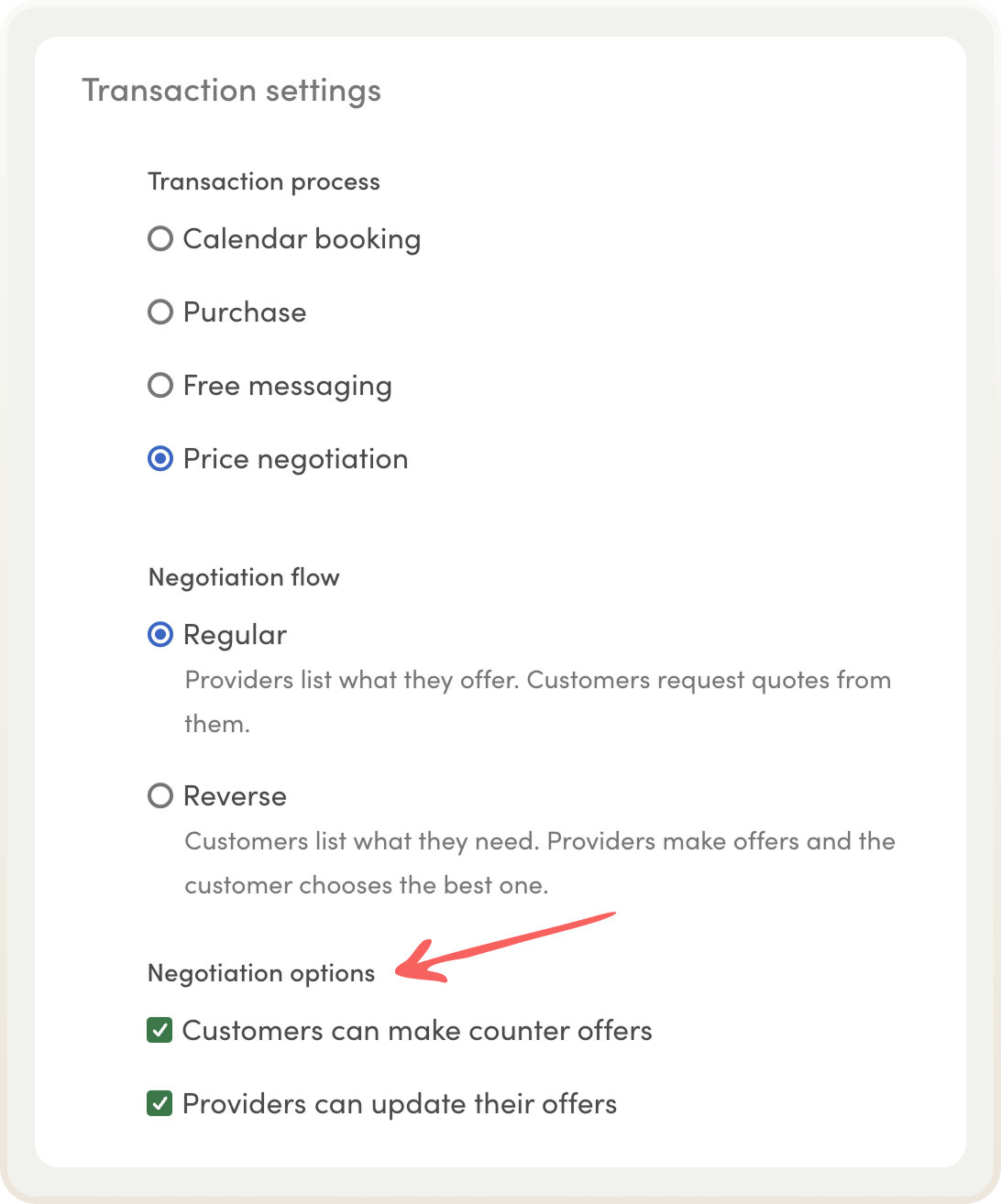
You can find the new negotiation options in listing type settings.
- Choose Price negotiation as your transaction process type—or update an existing listing type that already uses price negotiation.
- Choose the negotiation options you want your marketplace to use. You can enable one, both, or neither: Customers can make counter offers, Providers can update their offers.
- Save changes!
The update will be reflected in your marketplace right away.
How offer updates work
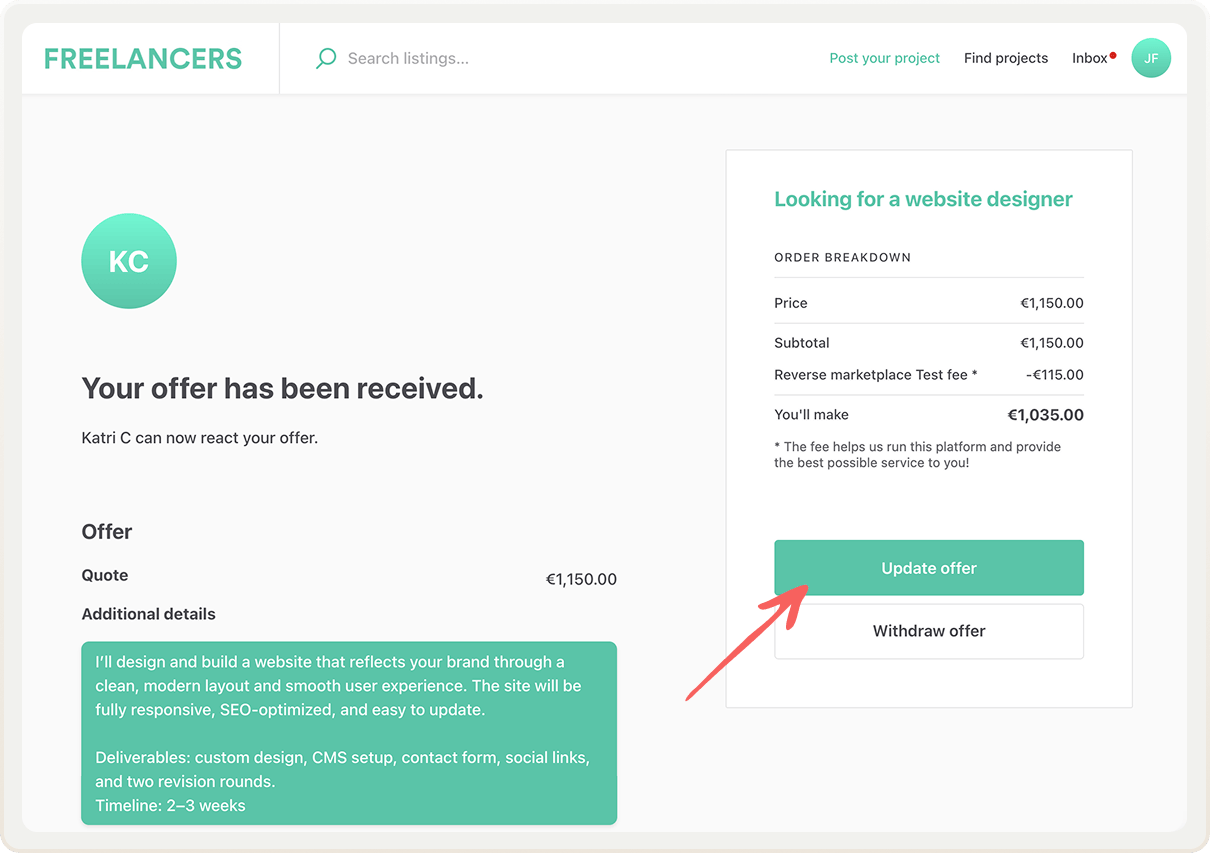
This release introduces a new way to change the initial offer: offer updates. When this feature is enabled, the provider can update both the quote and offer details they originally sent to the customer. Here's a quick overview of the flow:
- The provider sends an initial offer to the customer (either in a regular or reverse flow).
- The customer and provider discuss the details in messages.
- The provider updates their offer with a new quote and/or revised details based on the negotiation.
- The customer accepts the update.
- The customer accepts the offer and pays.
After the offer is accepted, the transaction flow continues as before.
Four different ways to negotiate
The new negotiation options enable four different combinations that support different kinds of marketplaces and customer expectations. All of these options are available in both the regular and reverse negotiation flows.
1. Enable both counter offers and offer updates
After the provider's initial offer, both parties can suggest updates to the price: the customer can make a counter offer, and the provider can update their own offer details and quote. This option works best for freelance and B2B marketplaces that need flexible back-and-forth negotiation.
2. Enable counter offers
After the provider's initial offer, the customer can make a counter offer. The provider can accept or reject it, or make a further counter offer. This works well for marketplaces where customers should have high negotiating power.
3. Enable offer updates
After the provider's initial offer, the provider can update their own offer details and quote. The customer will then accept or reject the update. It works great for freelance marketplaces where providers need to sometimes refine their offers after discussion.
4. Disable both negotiation options
The provider's initial offer is the only price on the table. The customer can accept or reject it. This creates a streamlined "take it or leave it" flow, which works best for marketplaces that offer standardized services.
In addition, the customer and provider can always discuss the offer and details in the transaction conversation.
Update marketplace texts
This launch introduces new marketplace texts. The default copy has been chosen to fit any kind of marketplace, regardless of industry. With marketplace and email texts, you can modify the terms to fit your specific idea or niche.
Copy the new marketplace texts and paste them into your marketplace text editor.
Ready to customize your negotiation flow?
With the new negotiation options, you can tailor the price negotiation process to match your marketplace’s needs—whether that's flexible back-and-forth negotiation, provider-led updates, customer counter offers, or a straightforward accept-or-reject flow.
Choose the combination that works best for your marketplace type and customer expectations.
Head to your listing type settings to get started!
Start your 14-day free trial
Create a marketplace today!
- Launch quickly, without coding
- Extend infinitely
- Scale to any size
No credit card required