Modify booking time intervals in time-based listings
In Sharetribe, listings can have either day-based or time-based availability. For listings with time-based availability, the available time slots are returned from the API as continuous stretches of time. The client application must therefore split the availability into suitable booking lengths.
The default behavior of the Sharetribe Web Template hourly listings is to split the continuous availability stretch into one hour bookable intervals. This how-to guide illustrates a handful of different cases on modifying booking lengths. These changes apply to all listings where the unit type is set to “hour”.
The Sharetribe Web Template also supports fixed timeslots, where the provider can choose the length of possible bookings, and the customer only selects a start time for their booking. This guide applies to non-fixed time slots, where the customer can select multiple intervals of the available booking length by setting a start time and an end time.
This guide builds on top of release v12.5.0 . If you are working on an earlier version, you will need to apply some of the changes from that version to support this use case in your template.
Set booking length to 30 minutes
The simplest use case is to create uniform 30 minute booking slots instead of hour long slots.
Use non-hour duration in FieldDateAndTimeInput.js
The src/util/dates.js file exports a bookingTimeUnits object that
describes time units used in the template. We can import
bookingTimeUnits in
src/components/OrderPanel/BookingTimeForm/FieldDateAndTimeInput.js, so
that we can replace usages of hard-coded ‘hour’ with a duration set as
one of the defined booking time units.
- FieldDateAndTimeInput.js
In addition, we want to import the functions getStartBoundaries and
getEndBoundaries to replace the hour-based getStartHours and
getEndHours so that we can use the half hour time unit.
import {
  getStartBoundaries,
  getEndBoundaries,
  bookingTimeUnits,
Then, let’s set the halfHour time unit to a variable duration. This
will make it easier to change the length of the duration later. We’ll
define this right after the imports.
We also set a variable minDurationInMinutes for the shortest bookable
time slot. We will use it when fetching time slots, so that we only need
to change it in one place later.
import css from './FieldDateAndTimeInput.module.css';

const duration = bookingTimeUnits.halfHour;
const minDurationInMinutes = duration.timeUnitInMinutes;
The next step is to replace the usage of getStartHours with
getStartBoundaries, and usage of getEndHours with
getEndBoundaries. Both pairs of functions take the same parameters,
except that getStartBoundaries and getEndBoundaries take an
additional timeUnit parameter. This is where we will use
duration.timeUnit.
    // If date next to selected start date is inside timeslot use the next date to get the hours of full day.
    // Otherwise use the end of the timeslot.
    const endLimit = isDateSameOrAfter(endDate, nextDate) ? nextDate : endDate;

    const hours = getStartBoundaries(startLimit, endLimit, timeZone, intl, duration.timeUnit);
    return availableHours.concat(hours);
  }, []);
return allHours; // If the selected end date is on the same day as timeslot end, use the timeslot end.
// Else use the start of the next day after selected date.
endLimit = isSameDate(getStartOf(endDate, 'day', timeZone), startOfEndDay)
? endDate
: dayAfterBookingEnd;
}
return getEndBoundaries(startLimit, endLimit, timeZone, intl, duration.timeUnit);
};For the function getAllTimeValues, we will change the time unit for
end time modification to use duration instead of the hard-coded ‘hour’
value.
  // Note: We need to remove 1ms from the calculated endDate so that if the end
  // date would be the next day at 00:00 the day in the form is still correct.
  // Because we are only using the date and not the exact time we can remove the
  // 1ms.
  const endDate = selectedEndDate
    ? selectedEndDate
    : startTimeAsDate
    ? new Date(findNextBoundary(startTimeAsDate, 1, duration.timeUnit, timeZone).getTime() - 1)
    : null;
Next, we’ll modify helper functions related to time slot fetching.
When fetching time slots from the API, we need to define the minimum
length of a booking that we want to show availability for. By default,
the BookingTimeForm fetches one hour slots, and now that we are using
half hour slots, we want to also fetch availability using our
minDurationInMinutes value.
We need to update the minimum duration in four places.
First, let’s change the interval length in the helper function for fetching month data.
    const options = {
      extraQueryParams: {
        intervalDuration: 'P1D',
        maxPerInterval: 1,
        minDurationStartingInInterval: minDurationInMinutes,
        perPage: 31,
        page: 1,
      },
    };

    // Fetch time slots for given time range
    onFetchTimeSlots(listingId, start, end, timeZone, options);
  }
};
Another place where we need to update the minimum duration is a helper function for when the booking start date changes and we need to fetch availability for the selected start date.
const updateBookingFieldsOnStartDateChange = params => {
  const {
    timeSlotsOnDate,
    monthlyTimeSlots,
    startDate,
    timeZone,
    seatsEnabled,
    formApi,
    intl,
  } = params;
  const minDurationStartingInDay = minDurationInMinutes;
The third place that needs the minimum duration update is in the
FieldDateAndTimeInput component itself.
// Currently available monthly data (reduced set of time slots data using intervalDuration: P1D)
const [startMonth, endMonth] = getMonthlyFetchRange(monthlyTimeSlots, timeZone);
const minDurationStartingInDay = minDurationInMinutes;
const options = { minDurationStartingInDay };
The fourth update is in a useEffect inside the component that logs
debugging data to console:
// This side effect just prints debug data into the console.log feed.
// Note: endMonth is exclusive end time of the range.
const tz = timeZone;
const nextMonth = nextMonthFn(currentMonth, tz);
const options = { minDurationStartingInDay: minDurationInMinutes };
Finally, we’ll update a helper function for when booking start date
changes. The onBookingStartDateChange function defines timeUnit as a
hard-coded 'hour', and we can replace that with the time unit from
duration.
// This callback function (onBookingStartDateChange) is called from DatePicker component.
// It gets raw value as a param - browser's local time instead of time in listing's timezone.
const startDate = timeOfDayFromLocalToTimeZone(value.date, timeZone);
const nextDay = getStartOf(startDate, 'day', timeZone, 1, 'days');

const { timeUnit } = duration;
This booking length change will not affect how providers can set their availability. For hourly listings, availability is set as full hours by default.
If you want to allow your providers to set availability in 15 minute
increments, you need to include both fixed and hourly listings in the
useIncrementalBoundaries prop when passing it from
EditListingAvailabilityPlanForm to AvailabilityPlanEntries and from
EditListingAvailabilityExceptionForm to ExceptionDateTimeRange.
Update ListingPage.duck.js and TransactionPage.duck.js to use non-hour duration
When fetching availability on the listing page, or on transaction page after an inquiry, we also need to consider the minimum duration.
- ListingPage.duck.js
- TransactionPage.duck.js
We need to update the fetchMonthlyTimeSlots thunk in two places for
each file to fetch availability for half hour intervals as well. Both
files already import bookingTimeUnits, so we can use it directly. The
examples below are from ListingPage.duck.js but the same changes apply
on TransactionPage.duck.js.
We first set duration to the half hour unit, and
minDurationInMinutes to its length:
const fetchMonthlyTimeSlots = (dispatch, listing) => {
  const hasWindow = typeof window !== 'undefined';
  const { availabilityPlan, publicData } = listing?.attributes || {};
  const tz = availabilityPlan?.timezone;

  const duration = bookingTimeUnits.halfHour;
  const minDurationInMinutes = duration.timeUnitInMinutes;
Next, we define timeUnit based on the duration.
const timeUnit = startTimeInterval
  ? bookingTimeUnits[startTimeInterval]?.timeUnit
  : unitType === 'hour'
  ? duration.timeUnit
  : 'day';
const nextBoundary = findNextBoundary(now, 1, timeUnit, tz);
And then we use minDurationInMinutes as the minimum duration:
const nextMonthEnd = isFixed
  ? getStartOf(nextMonth, 'minute', tz, bookingLengthInMinutes, 'minutes')
  : nextMonth;
const followingMonthEnd = isFixed
  ? getStartOf(nextAfterNextMonth, 'minute', tz, bookingLengthInMinutes, 'minutes')
  : nextAfterNextMonth;

const minDurationStartingInInterval = isFixed ? bookingLengthInMinutes : minDurationInMinutes;
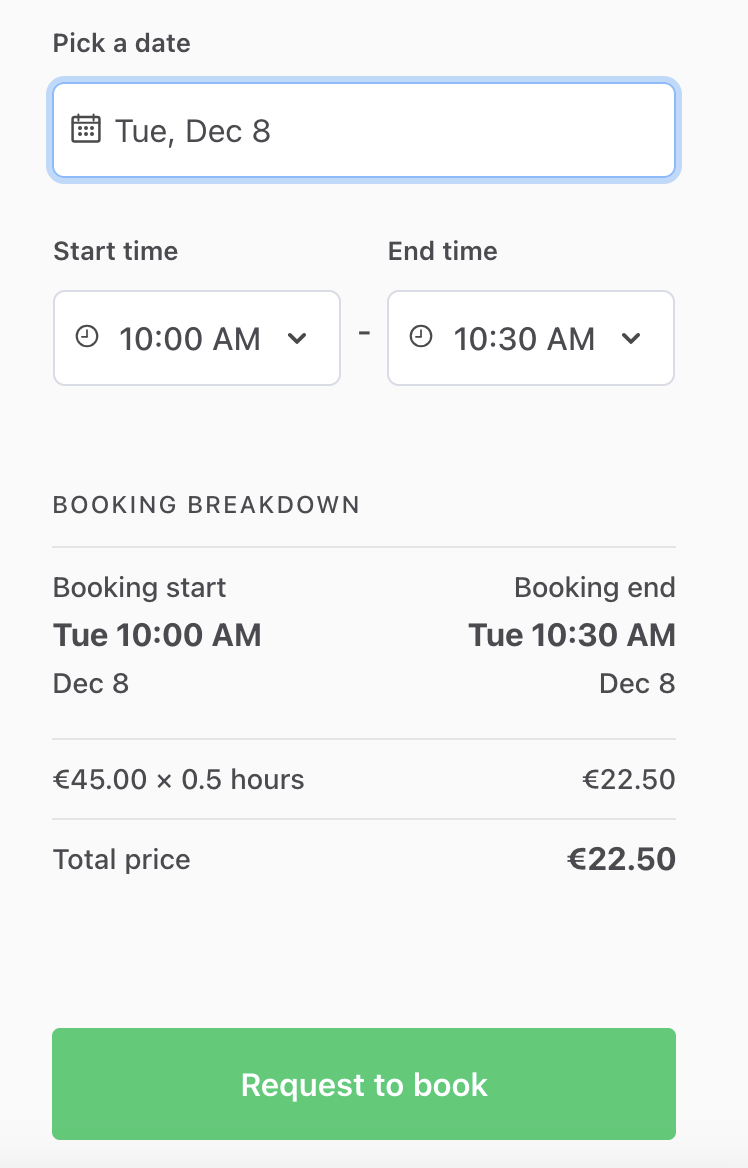
Now customers can make bookings with one or more 30 minute durations.
For listings with an hourly price, the server-side function
calculateQuantityFromHours in
server/api-util/lineItemHelpers.js
determines the correct quantity as a decimal of full hours. However, if
you want to set a price per minute, or e.g. a price per non-hour
session, you will need to modify calculateQuantityFromHours in that
file as well.
Use an irregular time slot
If your booking length does not divide an hour evenly, such as 45 or 75 minutes, you will need a few more changes. In this example, we use a 45 minute booking length.
The template rounds custom time units to multiples of the unit length. For a 45 minute unit, those multiples do not line up with full hours. As a result, depending on the start time of the availability (8 AM vs 9 AM vs 10 AM), the first time slot may start 15 or 30 minutes after the actual start time.
To fix this, we round to a shorter interval that does line up with full hours. To find that interval, we calculate the greatest common factor of the booking length and a full hour using the Euclidean algorithm . For a 45 minute booking length, the greatest common factor with an hour is 15 minutes. We then make sure that the first time slot starts at the first 15 minute mark of the availability.
Add new time unit and custom handling to dates.js
All rounding happens in src/util/dates.js.
- dates.js
First, let’s add a 45 minute time unit to bookingTimeUnits. The key
and the timeUnit value need to match, because the template looks up
the unit configuration by its timeUnit.
  quarterHour: {
    timeUnit: 'quarterHour',
    timeUnitInMinutes: 15,
    isCustom: true,
  },
  fortyFiveMinutes: {
    timeUnit: 'fortyFiveMinutes',
    timeUnitInMinutes: 45,
    isCustom: true,
  },
};
Time slot lengths that aren’t defined by default but that divide
evenly into an hour (e.g. 20 minutes) only require adding a new
bookingTimeUnits entry and a duration change in
FieldDateAndTimeInput.js, ListingPage.duck.js and
TransactionPage.duck.js. They don’t require the changes to
dates.js that are described below.
Then, let’s add a helper function gcf for the greatest common factor,
and a constant for the length of an hour in minutes. We can add them
right after the comment that lists the functions to modify for custom
time units.
// NOTE: If your customization is using different time-units than hours
// and different boundaries than sharp hours, you need to modify these functions:
// - findBookingUnitBoundaries (DST changes)
// - findNextBoundary
// - getSharpHours -> use getUnitBoundaries
// - getStartHours -> use getStartBoundaries
// - getEndHours -> use getEndBoundaries

const HOUR_MINUTES = bookingTimeUnits.hour.timeUnitInMinutes;

// Calculate the greatest common factor of two numbers
// using the Euclidean algorithm, e.g. gcf(45, 60) === 15
const gcf = (a, b) => (a ? gcf(b % a, a) : b);
Next, we’ll modify the findNextBoundary function. It calculates each
boundary by adding the unit length to the previous boundary, and then
rounding down to a multiple of the unit length.
We make two changes to how it handles custom time units:
- We round to the greatest common factor of the unit length and an hour, instead of the unit length itself.
- We add an
isFirstparameter. For the first boundary, we add the rounding length instead of the unit length. This moves the first boundary to the first 15 minute mark of the availability.
export const findNextBoundary = (currentDate, unitCount, timeUnit, timeZone, isFirst = false) => {
  const customTimeUnitConfig = bookingTimeUnits[timeUnit]?.isCustom
    ? bookingTimeUnits[timeUnit]
    : null;

  if (!!customTimeUnitConfig) {
    // If the time unit is custom, we need to use startOfMinuteBasedInterval function to adjust 00, 15, 30, 45 rounding.
    const customTimeUnitInMinutes = customTimeUnitConfig?.timeUnitInMinutes;
    // Round to an interval that lines up with full hours, e.g. 15 minutes for a 45 minute unit
    const roundingInMinutes = gcf(customTimeUnitInMinutes, HOUR_MINUTES);
    // Move the first boundary to the next rounding interval, so that bookings can start when availability starts
    const minuteOffset = isFirst ? roundingInMinutes : unitCount * customTimeUnitInMinutes;

    return moment(currentDate)
      .clone()
      .tz(timeZone)
      .add(minuteOffset, 'minute')
      .startOfMinuteBasedInterval(roundingInMinutes)
      .toDate();
  } else {
The half hour and quarter hour units divide an hour evenly. For them, the rounding length is the same as the unit length, so their boundaries do not change.
Finally, we need to pass true as the isFirst parameter when
getBoundaries calculates the first boundary.
  // Select a moment before startTime to find next possible sharp hour.
  // I.e. startTime might be a sharp hour.
  const millisecondBeforeStartTime = new Date(startTime.getTime() - 1);
  return findBookingUnitBoundaries({
    currentBoundary: findNextBoundary(millisecondBeforeStartTime, 1, timeUnit, timeZone, true),
Use new duration in FieldDateAndTimeInput.js
In the previous section, we set duration to the half hour unit. Now we
can change it to our new unit, and the booking form uses it everywhere.
- FieldDateAndTimeInput.js
import css from './FieldDateAndTimeInput.module.css';

const duration = bookingTimeUnits.fortyFiveMinutes;
const minDurationInMinutes = duration.timeUnitInMinutes;
Use new duration in ListingPage.duck.js and TransactionPage.duck.js
We make the same change in the fetchMonthlyTimeSlots thunk of both
files.
- ListingPage.duck.js
- TransactionPage.duck.js
const fetchMonthlyTimeSlots = (dispatch, listing) => {
  const hasWindow = typeof window !== 'undefined';
  const { availabilityPlan, publicData } = listing?.attributes || {};
  const tz = availabilityPlan?.timezone;

  const duration = bookingTimeUnits.fortyFiveMinutes;
  const minDurationInMinutes = duration.timeUnitInMinutes;
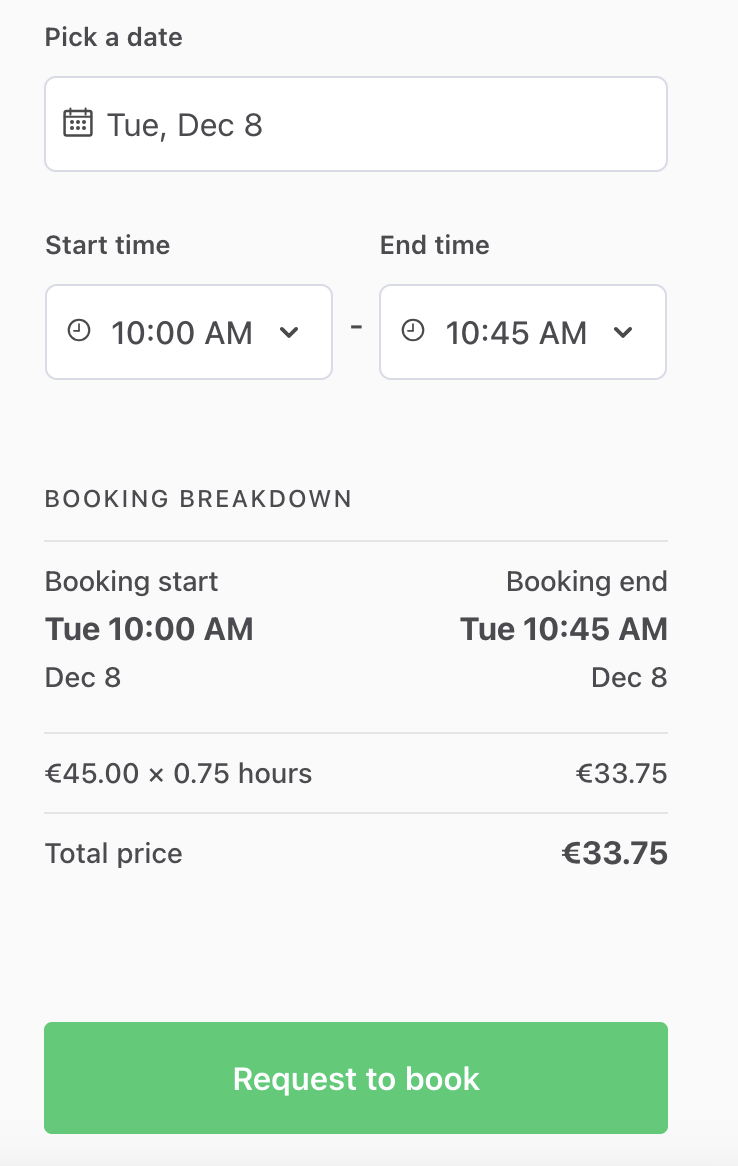
Now, customers can make bookings with 45 minute booking slots. Price is still calculated as a fraction of the hourly price.
Add separate handling for first timeslot
Sometimes, there are cases where you want to have a basic length for a booking and then different lengths for subsequent time slots. For instance, a listing could feature a 75 minute default bike rental with the option to extend it for 30 minutes at a time. In those cases, you need to create different handling for the first time slot, i.e. the first start and end boundaries.
This section builds on the previous section. We add a time unit that has two lengths: 75 minutes for the first time slot and 30 minutes for each extension. Then we use the two lengths in the booking form:
- Start times are 30 minutes apart, and each start time needs at least 75 minutes of availability after it.
- The first end time is 75 minutes after the start time. Each end time after that is 30 minutes later.
Add a new custom unit and first unit handling to dates.js
- dates.js
First, let’s add a new time unit to bookingTimeUnits. The
timeUnitInMinutes value is the length of each extension, and the new
firstUnitInMinutes value is the length of the first time slot.
  fortyFiveMinutes: {
    timeUnit: 'fortyFiveMinutes',
    timeUnitInMinutes: 45,
    isCustom: true,
  },
  customRental: {
    timeUnit: 'customRental',
    timeUnitInMinutes: 30,
    firstUnitInMinutes: 75,
    isCustom: true,
  },
};
Next, we need to include the first time slot length in the rounding. The first end time of a booking is 75 minutes after its start time. For that end time to fall on a rounding boundary, the rounding length needs to divide 75 minutes as well as the extension length and an hour. For a 75 minute first slot and 30 minute extensions, the rounding length is 15 minutes.
  if (!!customTimeUnitConfig) {
    // If the time unit is custom, we need to use startOfMinuteBasedInterval function to adjust 00, 15, 30, 45 rounding.
    const customTimeUnitInMinutes = customTimeUnitConfig?.timeUnitInMinutes;
    const firstUnitInMinutes = customTimeUnitConfig?.firstUnitInMinutes || 0;
    // Round to an interval that lines up with full hours and the first time slot length, e.g. 15 minutes for 75 and 30 minute units
    const roundingInMinutes = gcf(gcf(customTimeUnitInMinutes, HOUR_MINUTES), firstUnitInMinutes);
Time units without firstUnitInMinutes round the same way as before,
because the greatest common factor of any number and 0 is the number
itself.
Use new duration and customized timeslot filtering in FieldDateAndTimeInput.js
- FieldDateAndTimeInput.js
First, let’s set duration to our new time unit. The shortest bookable
time slot is now the first time slot length, so we also set
minDurationInMinutes to firstUnitInMinutes.
import css from './FieldDateAndTimeInput.module.css';

const duration = bookingTimeUnits.customRental;
const minDurationInMinutes = duration.firstUnitInMinutes;
The getStartBoundaries and getEndBoundaries functions assume that
start and end times are one time unit apart. getStartBoundaries
removes the last boundary, and getEndBoundaries removes the first one.
With a longer first time slot, we need to filter the boundaries
ourselves. So we replace both imports with getUnitBoundaries, which
returns every boundary in the given range.
import {
  getUnitBoundaries,
  bookingTimeUnits,
Then, let’s update the start times in getAvailableStartTimes. We keep
the start times that leave room for the first time slot before the
availability ends. The endLimit check removes the boundary at
midnight, which belongs to the next day.
    // If date next to selected start date is inside timeslot use the next date to get the hours of full day.
    // Otherwise use the end of the timeslot.
    const endLimit = isDateSameOrAfter(endDate, nextDate) ? nextDate : endDate;

    // Start times need enough availability for the first time slot
    const latestStart = getStartOf(endDate, 'minute', timeZone, -duration.firstUnitInMinutes, 'minutes');
    const hours = getUnitBoundaries(startLimit, endLimit, timeZone, intl, duration.timeUnit).filter(
      boundary => boundary.timestamp <= latestStart.getTime() && boundary.timestamp < endLimit.getTime()
    );
    return availableHours.concat(hours);
  }, []);
  return allHours;
Next, we’ll update the end times in getAvailableEndTimes. The first
end time is the first time slot length after the booking start. From
there, getUnitBoundaries adds 30 minutes at a time. When the customer
selects an end date after the start date, the filter keeps only the end
times on that date.
    // If the selected end date is on the same day as timeslot end, use the timeslot end.
    // Else use the start of the next day after selected date.
    endLimit = isSameDate(getStartOf(endDate, 'day', timeZone), startOfEndDay)
      ? endDate
      : dayAfterBookingEnd;
  }

  // The first end time is the first time slot length after the booking start
  const firstEndTime = getStartOf(bookingStartTimeAsDate, 'minute', timeZone, duration.firstUnitInMinutes, 'minutes');
  return getUnitBoundaries(firstEndTime, endLimit, timeZone, intl, duration.timeUnit).filter(
    boundary => boundary.timestamp > startLimit.getTime()
  );
};
Finally, in getAllTimeValues, the default end date also needs to
account for the first time slot length. Otherwise, a booking that starts
late in the evening gets an end date with no available end times.
  const endDate = selectedEndDate
    ? selectedEndDate
    : startTimeAsDate
    ? new Date(getStartOf(startTimeAsDate, 'minute', timeZone, duration.firstUnitInMinutes, 'minutes').getTime() - 1)
    : null;
Use custom time unit in ListingPage.duck.js and TransactionPage.duck.js
In the fetchMonthlyTimeSlots thunk of both files, we set duration to
the new time unit and minDurationInMinutes to the first time slot
length.
- ListingPage.duck.js
- TransactionPage.duck.js
const fetchMonthlyTimeSlots = (dispatch, listing) => {
  const hasWindow = typeof window !== 'undefined';
  const { availabilityPlan, publicData } = listing?.attributes || {};
  const tz = availabilityPlan?.timezone;

  const duration = bookingTimeUnits.customRental;
  const minDurationInMinutes = duration.firstUnitInMinutes;
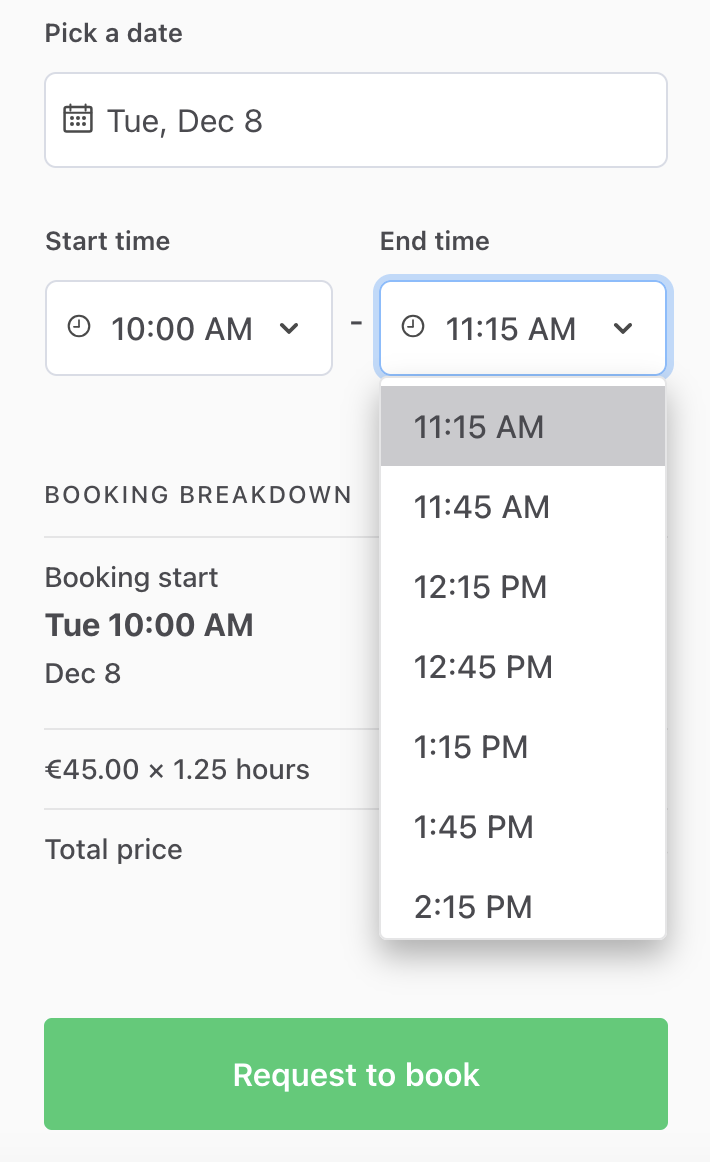
We can then see that after the first booking length of 75 minutes, the subsequent boundaries are 30 minutes each. Price is still calculated as a fraction of the hourly price.