Add buffer time to bookings in time-based listings
For some services booked by the hour, the listing author may want to reserve a buffer time between bookings. For instance a bike rental agency may want to check their bikes between rentals, or a massage therapist may need to clear up and restock their therapy space before the next customer arrives. You can set your marketplace to add these kinds of buffers by default, so listing authors do not need to add availability exceptions manually.
Add a 15 minute buffer between one hour bookings
The simplest use case for buffered bookings is having one hour slots that are bookable at the top of the hour, and adding 15 minutes of non-bookable time after each slot. To achieve that, we will use the booking’s display times.
A booking has a start time and an end time, and it can also have a display start time and a display end time. We save the booking end time with the buffer added, so that other customers can’t book over the buffer. The times the customer selected are saved as the display times, and the order breakdown shows those to the customer and the provider.
Add buffer helpers to dates.js
- dates.js
First, let’s add the buffer length and a helper function to
src/util/dates.js. The helper takes the booking dates the customer
selected. It adds the buffer to the booking end time, and saves the
selected times as display times. If there are no booking dates, it
returns an empty object.
export const START_DATE = 'startDate';
export const END_DATE = 'endDate';

export const bufferMinutes = 15;

// Add the buffer to the booking end time, and use the selected times as display times
export const addBufferToBookingDates = bookingDates =>
  bookingDates
    ? {
        ...bookingDates,
        bookingEnd: moment(bookingDates.bookingEnd)
          .add(bufferMinutes, 'minutes')
          .toDate(),
        bookingDisplayStart: bookingDates.bookingStart,
        bookingDisplayEnd: bookingDates.bookingEnd,
      }
    : {};
Add the buffer to bookings in CheckoutPage.duck.js
- CheckoutPage.duck.js
The checkout page passes the selected booking dates to the Marketplace
API in two places. speculateTransactionPayloadCreator fetches the
price breakdown before the customer confirms the order, and
initiateOrderPayloadCreator creates the transaction. We add the buffer
in both, so that the price breakdown and the actual transaction use the
same booking times.
First, let’s import the helper.
import * as log from '../../util/log';
import { addBufferToBookingDates } from '../../util/dates';
import { setCurrentUserHasOrders, fetchCurrentUser } from '../../ducks/user.duck';
Then, we use it in initiateOrderPayloadCreator instead of the plain
booking dates.
const initiateOrderPayloadCreator = (
  { orderParams, processAlias, transactionId, transitionName, isPrivilegedTransition },
  { dispatch, extra: sdk, rejectWithValue }
) => {
  /* ... */
  const quantityMaybe = quantity ? { stockReservationQuantity: quantity } : {};
  const bookingParamsMaybe = addBufferToBookingDates(bookingDates);
Finally, we make the same change in
speculateTransactionPayloadCreator.
const speculateTransactionPayloadCreator = (
  { orderParams, processAlias, transactionId, transitionName, isPrivilegedTransition },
  { dispatch, extra: sdk, rejectWithValue }
) => {
  /* ... */
  const quantityMaybe = quantity ? { stockReservationQuantity: quantity } : {};
  const bookingParamsMaybe = addBufferToBookingDates(bookingDates);
Calculate the price without the buffer in lineItems.js
- lineItems.js
By default, the price of an hourly booking is calculated from the
booking’s start and end times. The booking end time now includes the
buffer, but the customer should only pay for the time they selected. So
in getHourQuantityAndLineItems, we calculate the quantity until the
display end time.
The listing page also calculates a price estimate with the same function, before there are any display times. In that case, we use the booking end time as before.
const getHourQuantityAndLineItems = orderData => {
  const { bookingStart, bookingEnd, bookingDisplayEnd, seats } = orderData || {};
  const end = bookingDisplayEnd ?? bookingEnd;
  const hasSeats = !!seats;
  const units =
    bookingStart && end ? calculateQuantityFromHours(bookingStart, end) : null;
Leave room for the buffer in FieldDateAndTimeInput.js
- FieldDateAndTimeInput.js
The booking form shows start and end times based on the listing’s free time slots. Each booking now needs 15 minutes of free time after the selected end time. So we need to remove the start and end times that don’t leave room for the buffer. Otherwise, the customer could select times that overlap the next booking or the end of the availability, and the transaction can’t be created.
First, let’s import bufferMinutes and bookingTimeUnits.
import {
  getStartHours,
  getEndHours,
  bufferMinutes,
  bookingTimeUnits,
Then, right after the imports, let’s set the shortest booking length including the buffer: one hour and 15 minutes.
import css from './FieldDateAndTimeInput.module.css';

// The shortest booking is one hour, and the buffer comes after it
const bookingWithBufferInMinutes = bookingTimeUnits.hour.timeUnitInMinutes + bufferMinutes;
In getAvailableStartTimes, we keep the start times that leave room for
a one hour booking and the buffer before the time slot ends.
    // If date next to selected start date is inside timeslot use the next date to get the hours of full day.
    // Otherwise use the end of the timeslot.
    const endLimit = isDateSameOrAfter(endDate, nextDate) ? nextDate : endDate;

    // Start times need room for a one hour booking and the buffer
    const latestStart = getStartOf(endDate, 'minute', timeZone, -bookingWithBufferInMinutes, 'minutes');
    const hours = getStartHours(startLimit, endLimit, timeZone, intl).filter(
      boundary => boundary.timestamp <= latestStart.getTime()
    );
    return availableHours.concat(hours);
  }, []);
  return allHours;
Finally, in getAvailableEndTimes, we keep the end times that leave
room for the buffer before the time slot ends.
    // If the selected end date is on the same day as timeslot end, use the timeslot end.
    // Else use the start of the next day after selected date.
    endLimit = isSameDate(getStartOf(endDate, 'day', timeZone), startOfEndDay)
      ? endDate
      : dayAfterBookingEnd;
  }

  // End times need room for the buffer
  const latestEnd = getStartOf(endDate, 'minute', timeZone, -bufferMinutes, 'minutes');
  return getEndHours(startLimit, endLimit, timeZone, intl).filter(
    boundary => boundary.timestamp <= latestEnd.getTime()
  );
};
Now, if someone has booked 6 PM to 7 PM, the listing is booked until 7:15 PM. Another customer can’t book 5 PM to 6 PM, because the buffer after it would overlap the 6 PM booking. After the 6 PM booking, the next available start time is 8 PM.
Allow users to book buffered appointments at non-sharp hours
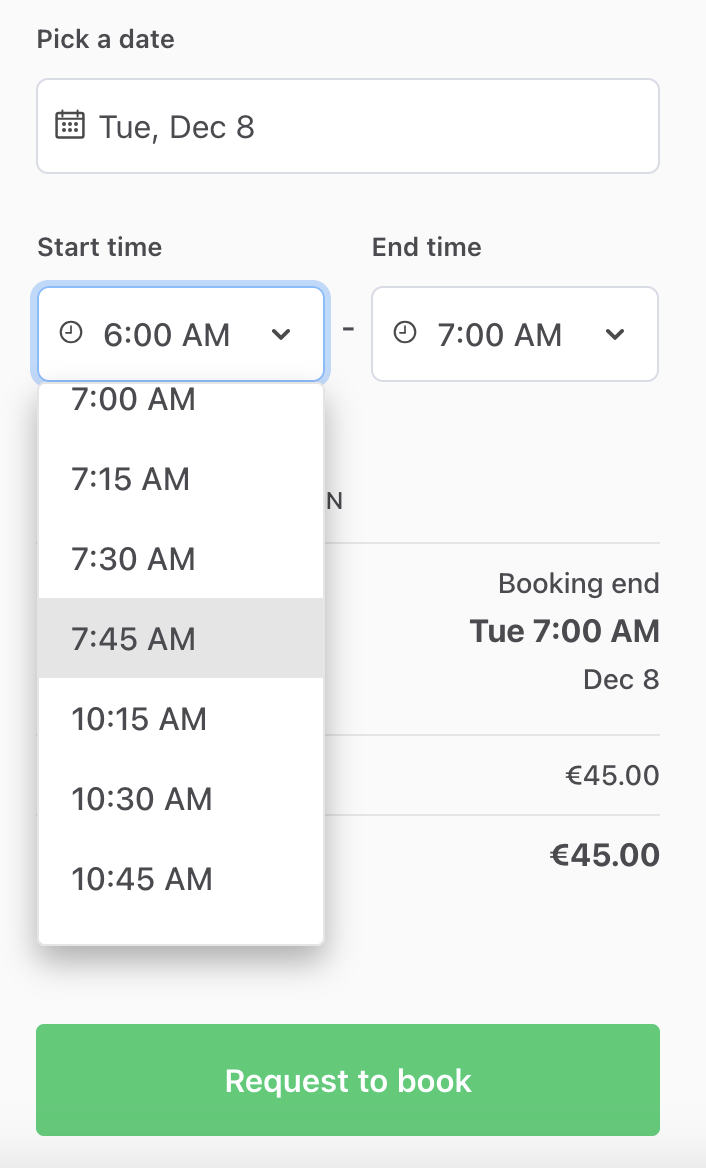
With start times only at the top of the hour, the time between the buffer and the next full hour stays unbooked. For example, if someone books the 8 AM - 9 AM slot, the listing is booked until 9:15 AM, and the next available start time is 10 AM. If we do not want to leave extra gaps between bookings beyond the buffer, we can let bookings start at any quarter hour. That way, the next available start time is 9:15 AM, right after the buffer.
In other words, we need to have start and end times at a different cycle:
- start times at 15 minute increments, i.e. a customer can start their booking at any quarter hour, instead of at the top of the hour only
- end times at one hour increments from the start time, i.e. the customer can book one or more full hours only.
This section builds on the previous section, and all changes are in the booking form.
Start bookings at any quarter hour in FieldDateAndTimeInput.js
- FieldDateAndTimeInput.js
The getStartHours and getEndHours functions only return full hours.
The template also has getStartBoundaries and getEndBoundaries
functions, which work the same way, but take a time unit as an
additional parameter. First, let’s import them instead.
import {
  getStartBoundaries,
  getEndBoundaries,
  bufferMinutes,
  bookingTimeUnits,
Then, let’s add two constants after bookingWithBufferInMinutes. For
start times, we use the template’s 15 minute quarterHour time unit,
because it matches the buffer length. For end times, we need the length
of an hour in milliseconds.
// The shortest booking is one hour, and the buffer comes after it
const bookingWithBufferInMinutes = bookingTimeUnits.hour.timeUnitInMinutes + bufferMinutes;
// Bookings can start at any quarter hour, and they last full hours
const startTimeUnit = bookingTimeUnits.quarterHour;
const bookingUnitInMs = bookingTimeUnits.hour.timeUnitInMinutes * 60 * 1000;
In getAvailableStartTimes, we replace getStartHours with
getStartBoundaries and pass the quarter hour time unit. The filter
from the previous section still removes the start times that don’t leave
room for a one hour booking and the buffer.
    // Start times need room for a one hour booking and the buffer
    const latestStart = getStartOf(endDate, 'minute', timeZone, -bookingWithBufferInMinutes, 'minutes');
    const hours = getStartBoundaries(startLimit, endLimit, timeZone, intl, startTimeUnit.timeUnit).filter(
      boundary => boundary.timestamp <= latestStart.getTime()
    );
    return availableHours.concat(hours);
  }, []);
  return allHours;
In getAvailableEndTimes, we also use quarter hour boundaries. Then we
keep the ones that are a full number of hours after the booking start.
This way, a booking that starts at 10:15 AM can end at 11:15 AM or 12:15
PM, but not at 11 AM.
  // End times need room for the buffer, and they are full hours after the booking start
  const bookingStartTimestamp = bookingStartTimeAsDate.getTime();
  const latestEnd = getStartOf(endDate, 'minute', timeZone, -bufferMinutes, 'minutes');
  return getEndBoundaries(startLimit, endLimit, timeZone, intl, startTimeUnit.timeUnit).filter(
    boundary =>
      boundary.timestamp <= latestEnd.getTime() &&
      (boundary.timestamp - bookingStartTimestamp) % bookingUnitInMs === 0
  );
};
Now, if we have a booking from 9 AM to 10 AM with a 15 minute buffer at the end, the next customer can start their booking at 10:15 AM. Conversely, the previous booking can begin 7:45 AM and no later, so that the buffered time slot can fit in before the already booked session.