Social logins & SSO
This document gives an overview of how different login solutions work with Sharetribe. To find guidance on how to implement login using a specific service, refer to the following how-to guides:
- Enable Facebook login
- Enable Google login
- Enable OpenID Connect login
- How to set up OpenID Connect proxy in Sharetribe Web Template
How a third party identity provider authentication works
In addition to username and password based authentication, Sharetribe allows marketplace users to authenticate using a third party identity provider. An identity provider can be used to authenticate the user
- when a new user account is created
- or when a user logs into the marketplace to a previously created account
If the user is logging in to an existing account, it is not necessary that the account was originally created using the identity provider. If the Sharetribe user has a verified email address that matches the verified email address in the identity provider token, the user can authenticate to the matching account with the identity provider.
A general overview of using a third party identity provider when logging in or creating a user is as follows:
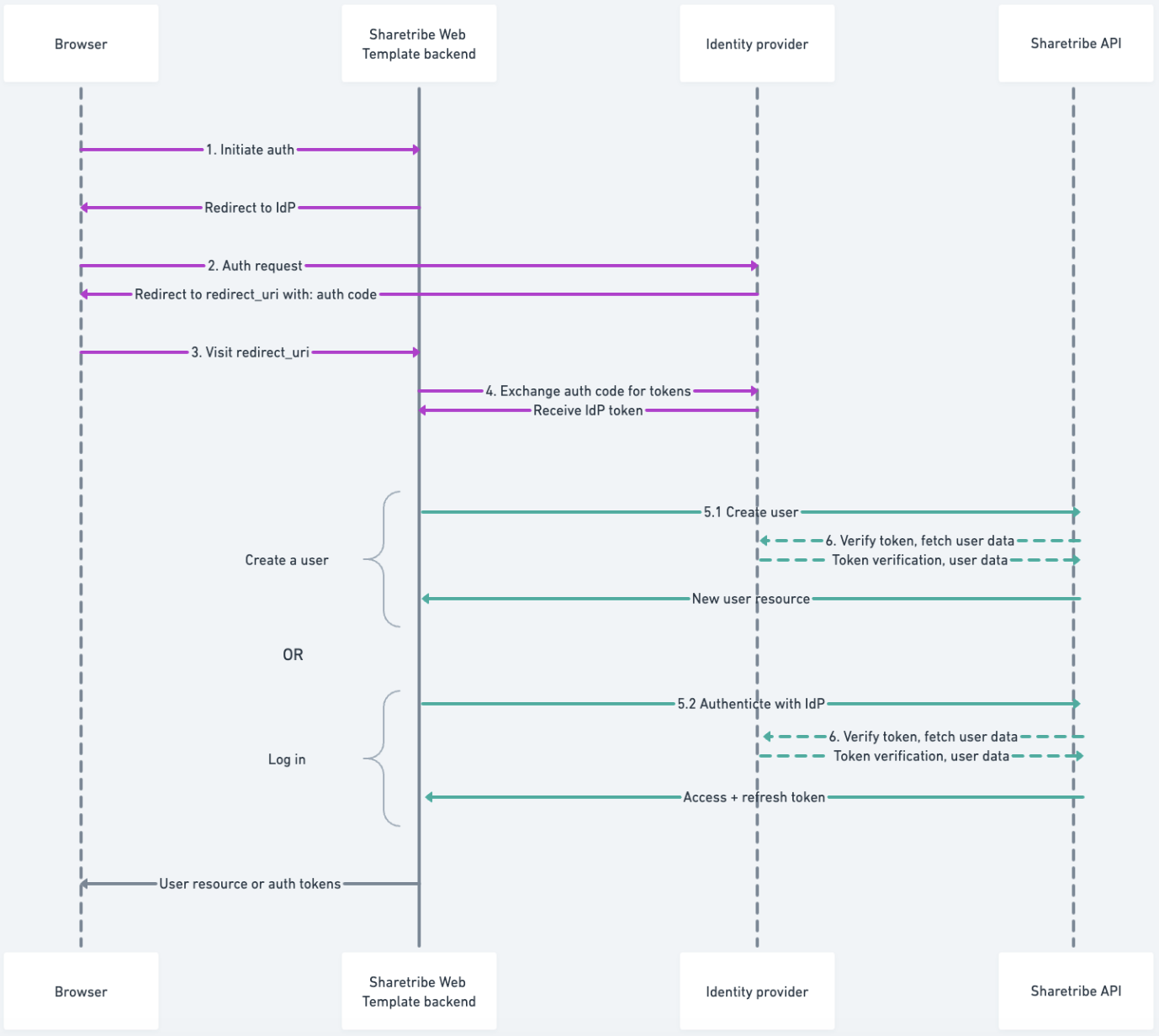
The different actors in the diagram above are:
- Browser The Sharetribe Web Template React application running in user’s browser
- Template backend Sharetribe Web Template Node application that runs on a server
- Identity provider A service that provides user authentication, for example, Facebook
- Sharetribe API Sharetribe Marketplace or Auth API
Steps 1-4 describe a standard OAuth2/OpenID Connect login flow. The details may differ depending on the identity provider that is being used.
Initiate authentication in the marketplace
The Sharetribe Web Template client calls the Sharetribe Web Template browser to initiate the SSO authentication, and initiates a redirect to the identity provider’s site.
Authenticate user with the identity provider
The user takes the necessary steps to authencate with the identity provider. After a successful authentication, an authorization code is returned from the identity provider.
Call the redirect_uri on the server
The redirect_uri you define in your identity provider should have a
corresponding endpoint on your server. For the built-in Google and
Facebook SSOs, this endpoint exists by default in the Sharetribe Web
Template. For any custom SSO implementations, you need to create this
endpoint.
Exchange the authorization code for a token with the identity provider
From the endpoint in redirect_uri, the server sends a request to the
identity provider to trade the authorization code for a token. The token
that is obtained depends on the identity provider and protocol in use.
Read more about the types of tokens expected by each supported identity
provider:
Call the Sharetribe API with the token
5.1 Invokes /current_user/create_with_idp endpoint in Sharetribe
Marketplace API. The token obtained from steps 1.-4. is passed here
among a few other details. Returns a current user entity.
5.2 Invokes /auth_with_idp endpoint in Sharetribe Auth API. The
token obtained from steps 1.-4. is passed here among a few other
details. Returns access and refresh tokens.
Step 5.1 does not yet authenticate the user to the marketplace. If you create a user with an identity provider token, you need to use that same token to then immediately authenticate the newly created user to the marketplace.
Validate the token
The Sharetribe backend validates the token passed in as a parameter in 5.1 or 5.2. Depending on the identity provider in use, this may or may not include a request to the identity provider.
After these steps are successful, the user has the necessary authentication to use the marketplace.